Introducing

AllPro Vision

AI-powered video analytics for safety, security and loading.

AllPro Vision uses AI to watch the CCTV cameras you already have. It spots a missing helmet, fire or smoke, a person in a no-go zone or a forklift near miss within seconds, and counts every box and tyre loaded or unloaded at the dock.

  • 24×7 technical support
  • Alerts in seconds
  • Web and Android app
Overview

Your cameras already see everything. Now they tell you.

Most CCTV footage is only checked after something goes wrong. AllPro Vision is one AI platform that watches every camera, all the time, and sends the right person a clear alert with the picture while there is still time to act.

Choose the AI checks each camera needs, from helmet and vest checks to fire alarms, no-go zones, number plates and loading counts. Your team gets the alerts on the web dashboard and on the Android app, and can ask Vision questions by voice and listen to the answers in multiple languages.

AIReal-time detection of people, vehicles, fire and goods
SecondsFrom the event to an alert with a photo
Ask VisionAsk by voice and listen to answers in multiple languages
24×7Technical support on call, WhatsApp and email
Why AllPro Vision

One platform for every camera on your site.

  • Works with your existing IP cameras and NVRs, with no rewiring
  • Alerts in seconds, each with a photo and a short clip as proof
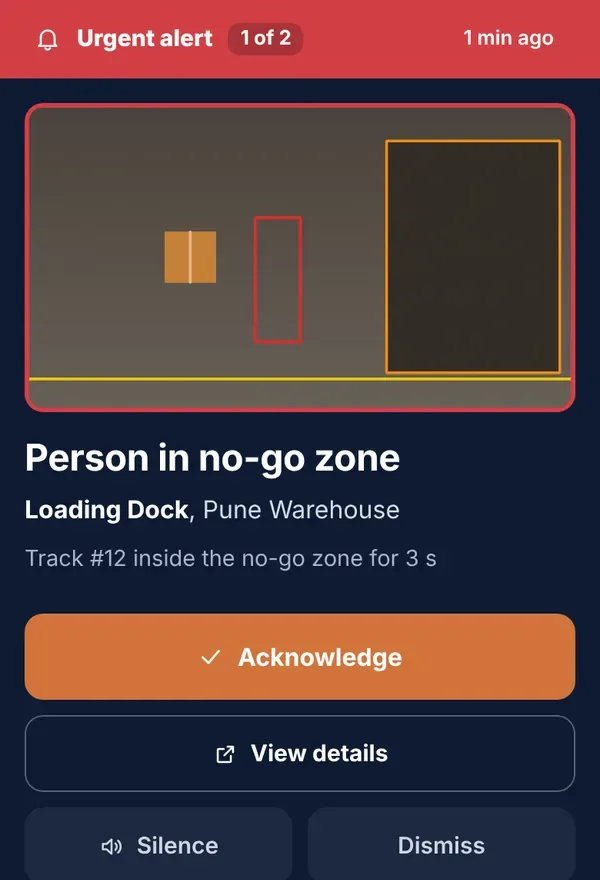
  • Urgent alerts ring full screen on the phone until someone responds
  • Fire and smoke alarms confirmed by an operator in one tap
  • Every box and tyre counted at the dock and checked against the manifest
  • Helmet colour rules by area, such as white helmets for engineers only
  • Each site, camera and alert type goes to the right team
  • Trial mode on your own footage before alerts go live
  • Ask Vision: ask by voice and listen to the answer, in multiple languages
  • New AI checks added regularly, on the cameras you already have
  • Face ID only with consent, and you decide how long evidence is kept
  • Gets more accurate for your site as your team marks false alarms
  • 24×7 technical support on call, WhatsApp and email
  • Setup, training and help from the AllPro team
Features

A growing set of AI checks. Switch on the ones each camera needs.

Draw the zones and counting lines on the camera picture, pick who gets which alerts, and start in trial mode.

A worker in a hard hat and hi-vis vest checking stock in a warehouse

Helmet, vest and helmet colour

Checks each person for a helmet and a hi-vis vest, and which helmet colour they wear. Set the colours allowed in each area.

Thick black smoke and flames rising from a factory fire

Fire and smoke alarm

Flames or smoke that stay in view raise a fire alarm. An operator confirms it in one tap, and it can sound the site siren.

A security officer watching several CCTV screens in a control room

No-go zones and security

Restricted areas, after-hours entry, loitering, face ID with consent and number plates at the gate.

A forklift working in a warehouse aisle next to a worker

Forklift and vehicle near miss

An urgent alert when a person comes too close to a moving forklift, truck or car.

Two workers loading cardboard boxes into a delivery van

Loading and unloading count

Counts loading and unloading on the same dock, with a photo of every item, and flags a short count before the truck leaves.

Rows of tyres stacked on racks in a warehouse

Boxes and tyres, told apart

Separates cartons from tyres, drums and coils, so the report shows how many of each were moved.

A factory engineer in a hard hat checking alerts on a tablet

Android app and alert inbox

Urgent alerts on the phone, an inbox with every photo and clip, incidents, search, trends and reports.

A woman asking a question by voice on her phone

Ask Vision

Ask “how many helmet alerts today?” by voice and listen to the answer, in multiple languages.

AI checks at a glance

More AI checks are added regularly.

Safety

  • Helmet and hi-vis vest
  • Helmet colour by area
  • Fire and smoke
  • Vehicle near miss
  • Person down
  • Crowding

Security

  • No-go zones
  • After-hours entry
  • Loitering
  • Face ID with consent
  • Number plates at the gate

Loading and operations

  • Loading and unloading count
  • Boxes and round items
  • Vehicle count and parking overstay
  • People count per shift
  • Workstation left unattended

Alerts and reports

  • Web dashboard and Android app
  • Urgent full-screen alerts
  • Incidents and investigation
  • Daily and weekly reports
  • Ask Vision voice assistant
Ask Vision

Just ask. Vision answers out loud.

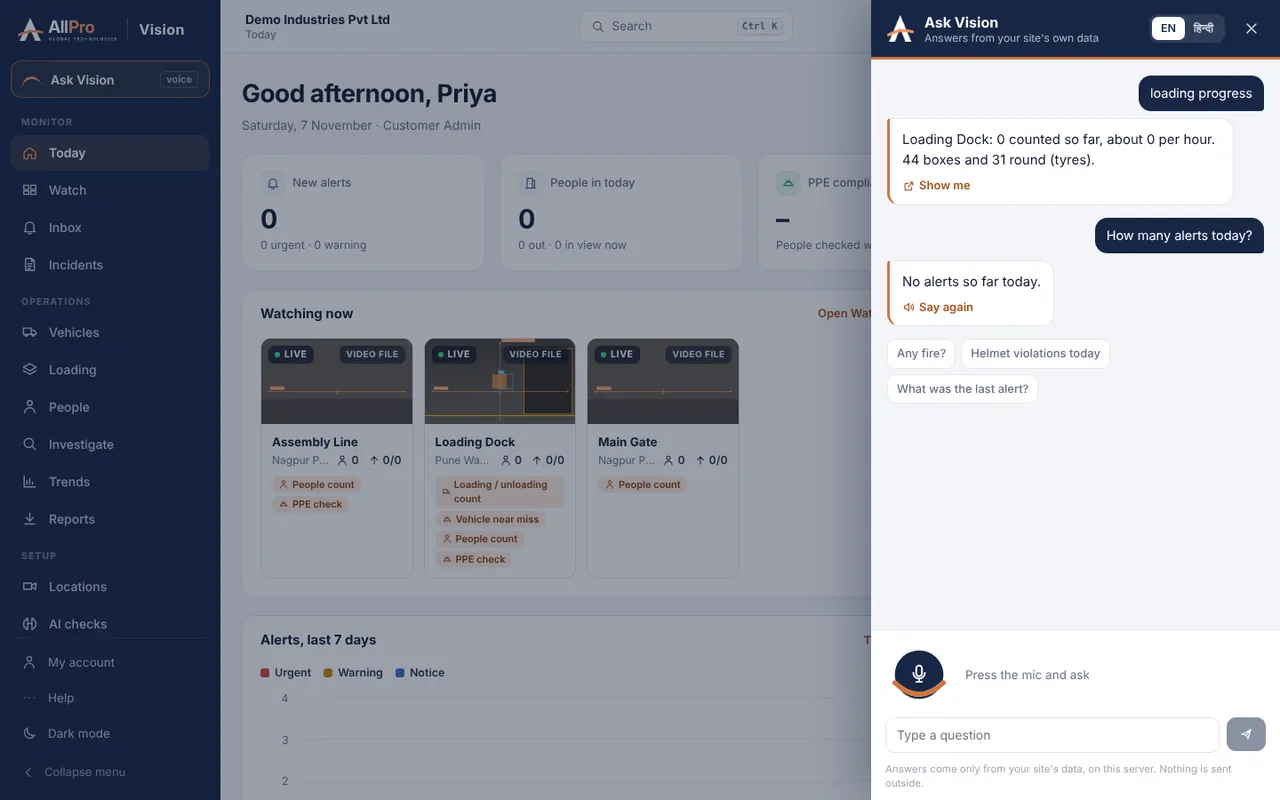
Ask Vision is the AI assistant built into AllPro Vision. Press the mic, ask a question in your own language and listen to the answer. It reads your live site data, so the answer is about your cameras, today.

  • Ask by voice or by typing“How many helmet alerts today?”, “Any fire on the night shift?”, “How far is loading at Dock 2?”
  • Listen to the answerVision speaks the answer back, and can read urgent alerts aloud on the control room screen.
  • Multiple languagesAsk and listen in the language your team is comfortable with, including English and Hindi.
  • Takes you thereOpens the right camera, alert or report for the answer, in one tap.
A plant engineer in a hard hat asking Vision a question on her phone

“Aaj kitne helmet alerts aaye?”

Ask Vision

Aaj 3 helmet alerts aaye, teeno Assembly Line par. 2 acknowledge ho chuke hain.

EnglishहिंदीMore languages
Product tour

Built for supervisors, not just IT.

These are real screens from AllPro Vision: what happened, where, and what to do next, on the control room screen and on the phone.
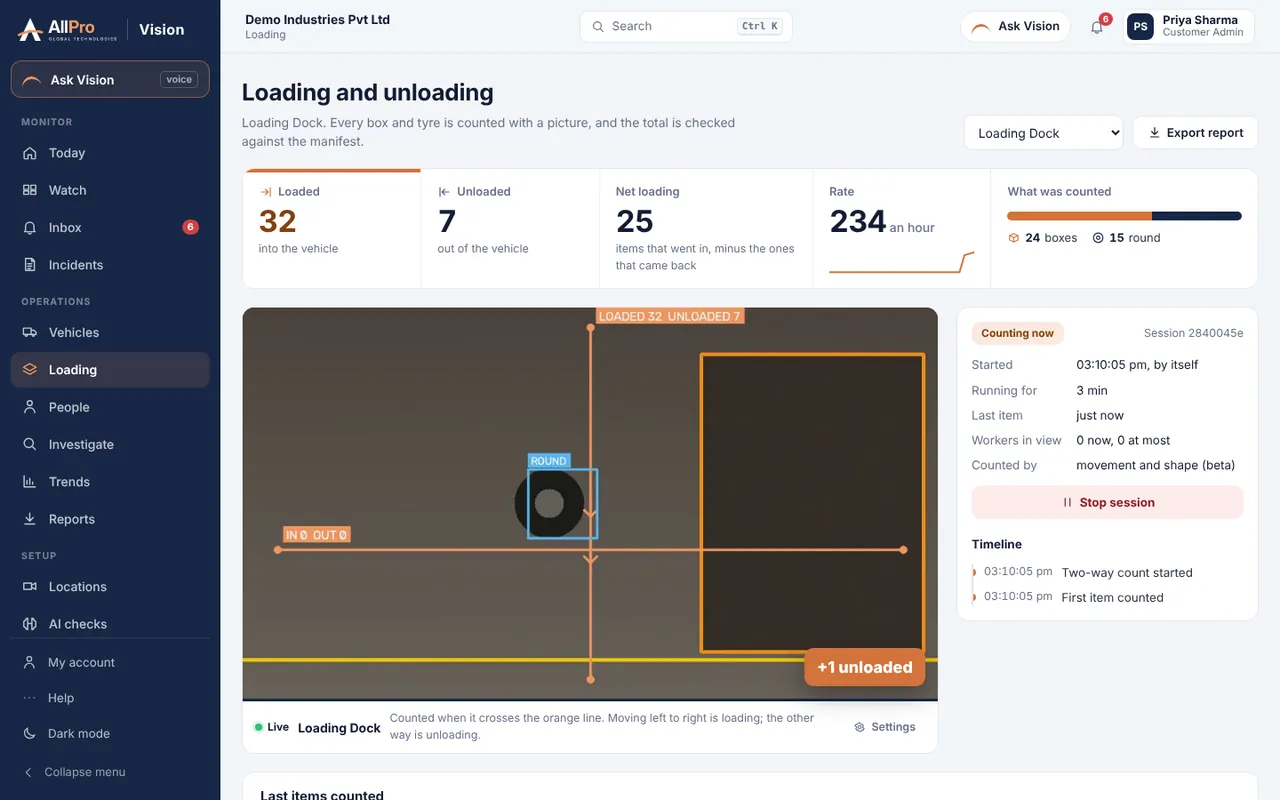
AllPro Vision Loading page: loaded and unloaded counts, net loading, rate per hour, boxes versus round items, the live dock camera and the session timeline.
Loading and unloading Live counts at the dock, split into boxes and round items, with every item's picture.
Ask Vision panel: a question about loading progress and the spoken answer with the loaded and unloaded counts.
Ask Vision Ask out loud, get the answer from your own data.
Urgent alert on a phone: Person in no-go zone, with the camera picture and buttons to acknowledge, view details, silence or dismiss.
Urgent alert on the phone The picture first, then acknowledge in one tap.
Applicable industries

One product, every kind of site.

AllPro Vision is used wherever cameras watch people, vehicles and goods. These are the industries it is built for.

Manufacturing

PPE, no-go zones around machines, fire

Automotive and auto parts

Shop floor safety, tyre and part counts

Textiles and garments

Fire, crowding, people per shift

Pharma and chemicals

Restricted clean areas, fire and smoke

Food, beverage and FMCG

Dock counts, hygiene zones, PPE

Steel, metals and foundries

Helmet colour, hot zones, near misses

Energy, power, oil and gas

Fire and smoke, perimeter, PPE

Construction and infrastructure

Helmet by role, person down, site security

Warehousing and 3PL

Box counts at every dock, forklift safety

Cold storage and cold chain

Loading counts, after-hours entry

Ports, yards and container depots

Number plates, vehicle time, perimeter

Retail and malls

People count, crowding, stock rooms

Banks and offices

Unknown faces, after-hours movement

Hospitals and healthcare

Restricted wards, person down, fire

Schools and campuses

Gate vehicle log, after-hours entry

Hotels and hospitality

Back-of-house safety, parking, fire

How it works

Live in days, not months.

We set Vision up with you camera by camera, run it in trial mode on your own footage, and switch alerts on once you are happy with what it finds.

Plan a trial at your site
  1. Connect your cameras

    Add each camera's stream address, or start with recorded video from your site.

  2. Choose the checks

    Pick the AI checks per camera, draw zones and counting lines, and set who gets which alerts.

  3. Trial, then go live

    Run each check in trial mode first. Turn alerts on for the team when the results are right.

  4. Gets better with use

    Mark false alarms with one tap. We use your feedback and footage to train models for your site.

FAQ

Questions about AllPro Vision.

Anything else? Write to us and we reply within one working day.

Talk to our expert
Do we need new cameras?

Usually not. Vision works with most IP cameras and NVRs that give an RTSP video stream. For number plates and faces, the camera needs to face the gate or entry at close range. We check your cameras during the demo.

How accurate is the AI?

It depends on the camera angle, light and distance. That is why every site starts in trial mode on its own footage, and you switch alerts on only when you are satisfied. Your feedback on each alert is used to make it more accurate for your site.

Which languages does Ask Vision support?

Ask Vision understands spoken questions and speaks the answers in multiple languages, including English and Hindi. Tell us the languages your team uses and we will set them up for your site.

Where is our video stored?

Vision does not replace your recorder. It keeps only the photos and short clips of alerts, on the server you choose, for the number of days you set.

Can we try it before buying?

Yes. Send us a short video from your site and we show you what Vision finds, or we run a trial on a few of your cameras.

What support do we get?

AllPro gives 24×7 technical support on call, WhatsApp and email. Our team helps you set up cameras and AI checks, trains your supervisors and stays with you after go-live.

What does it cost?

It depends on the number of cameras and the checks you need. Share these with us and we send a quote.

Request a free demo

Fields marked * are required.